Customers expect online services to work at all times. When a website, application, or service experiences problems, users want quick and clear updates. If businesses fail to communicate during outages, customers may become frustrated and lose trust in the brand.
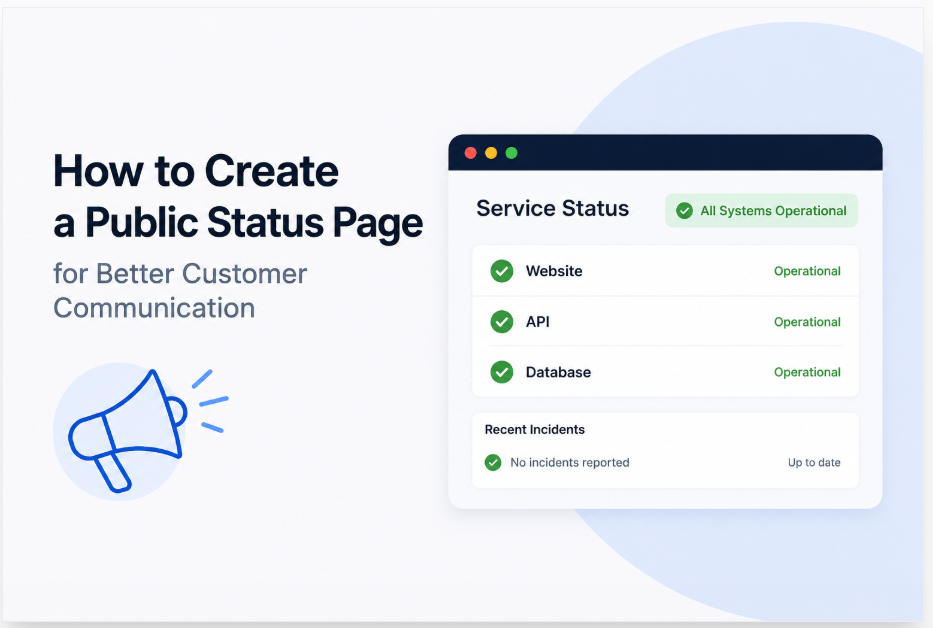
A public status page helps solve this problem by providing a central place where users can check service updates. It allows companies to share information about outages, maintenance activities, and service performance in real time. Customers can visit the page whenever they want to understand what is happening.
Creating a public status page is not difficult, but it requires planning and consistency. This guide explains the key steps involved in building an effective status page that improves customer communication and strengthens trust.
What Is a Public Status Page?
A public status page is a web page that displays the current condition of a company’s services. It provides updates about uptime, outages, maintenance events, and system performance. Customers can access this information at any time without contacting support teams.
The main purpose of a status page is transparency. Instead of leaving customers wondering why a service is unavailable, businesses can provide timely updates. This reduces confusion and helps users understand the situation.
Many software companies, online stores, and digital service providers use status pages today. These pages have become an important communication tool because customers expect fast access to accurate information during service interruptions.
Why Customer Communication Matters
Good communication helps customers feel informed and valued. When technical issues occur, people want to know that a company is aware of the problem and working on a solution. Silence often creates uncertainty and frustration.
A public status page allows businesses to communicate directly with customers. Instead of answering the same questions repeatedly through email or support tickets, companies can post updates that everyone can see.
Clear communication also protects a company’s reputation. Customers are often more forgiving when businesses are honest about issues. Regular updates demonstrate responsibility and help maintain confidence even during difficult situations.
Define the Purpose of Your Status Page
Before creating a status page, decide what information you want to share. Some businesses only report outages, while others provide detailed performance metrics and maintenance schedules. Defining your goals helps create a better experience.
Think about the needs of your customers. Consider what information they typically request during service disruptions. This can help you decide which systems, services, and updates should appear on the page.
A clear purpose also helps maintain consistency. When everyone understands the role of the status page, it becomes easier to create updates that are useful, accurate, and relevant to your audience.
Choose the Services to Monitor
Your status page should focus on the services that customers depend on most. These may include websites, mobile applications, payment systems, APIs, or customer portals. Monitoring the right services ensures useful communication.
Start by listing all important systems within your organization. Then identify which services have the greatest impact on customers. These should receive the highest priority when creating status updates.
Avoid overwhelming users with unnecessary information. Too many technical details can make the page difficult to understand. Focus on the services that directly affect the customer experience and overall business operations.
Select a Reliable Status Page Tool
Many companies use dedicated tools to create and manage status pages. These platforms simplify monitoring, reporting, and customer notifications. They often include automation features that save time and improve accuracy.
When comparing tools, look for customization options, notification features, and monitoring integrations. A good solution should allow easy updates and provide a professional appearance that matches your brand.
Some monitoring platforms, including UptimeRobot, offer status page features that can help businesses quickly publish service updates. Choosing the right tool makes the entire process easier and more efficient.
Design a Simple and Clear Layout
A status page should be easy to read and understand. Customers often visit the page during stressful situations when they need answers quickly. A simple design helps them find information without confusion.
Place the most important information near the top of the page. Display current service status, active incidents, and planned maintenance events in a clear and organized manner. Avoid unnecessary clutter.
Use simple language whenever possible. Technical terms may confuse some users. Clear descriptions help customers understand what is happening and what actions the company is taking to resolve the issue.
Create a Process for Incident Updates
A status page is only useful if it contains timely updates. Businesses should establish a process for reporting incidents and publishing new information as situations develop. This ensures consistency during service disruptions.
Assign responsibility to specific team members who will manage updates. Having designated personnel prevents delays and helps maintain accurate communication. Clear roles are especially important during major incidents.
Each update should explain the issue, current progress, and expected next steps. Customers appreciate transparency. Even if there is no immediate solution, regular updates show that the company is actively working on the problem.
Include Scheduled Maintenance Notices
Not all service interruptions are unexpected. Planned maintenance is often necessary to improve performance, security, and reliability. Informing customers in advance helps reduce frustration and confusion.
A public status page is an ideal place to announce maintenance activities. Include details about the expected start time, duration, and any potential service impact. This allows users to plan accordingly.
After maintenance is completed, update the page with confirmation that services have returned to normal. Keeping customers informed before, during, and after maintenance builds trust and demonstrates professionalism.
Enable Customer Notifications
Many users prefer receiving updates automatically instead of checking a status page repeatedly. Notification features help businesses deliver important information directly to customers when incidents occur.
Consider offering email, SMS, or other alert options. Customers can subscribe and receive updates whenever service conditions change. This improves communication and keeps users informed throughout an incident.
Automated notifications also reduce support requests. When customers receive timely updates, they are less likely to contact support teams for information. This allows staff to focus on resolving technical issues.
Review and Improve Your Status Page
Creating a status page is not a one-time task. Businesses should regularly review their effectiveness and identify opportunities for improvement. Customer feedback can provide valuable insights about the user experience.
Analyze previous incidents to determine whether updates were clear and timely. Look for communication gaps that may have caused confusion. Continuous improvement helps maintain a high standard of customer communication.
Tools such as UptimeRobot can provide monitoring data that supports better reporting and transparency. Regular reviews ensure the status page remains useful, accurate, and aligned with customer expectations.
In Summary
A public status page is one of the most effective ways to improve customer communication during outages and maintenance events. It provides transparency, reduces uncertainty, and helps customers stay informed about service availability.
By choosing the right tools, monitoring important services, publishing regular updates, and offering notifications, businesses can create a reliable source of information for their users. These efforts strengthen customer trust and reduce unnecessary support requests.
As customer expectations continue to grow, clear communication becomes increasingly important. A well-managed status page helps businesses build credibility, improve customer satisfaction, and maintain strong relationships even when technical challenges arise.
FAQs
1. What is the purpose of a public status page?
A public status page provides real-time information about the availability and performance of a company's services. It helps customers stay informed about outages, maintenance activities, and system issues. Instead of contacting support for updates, users can visit the status page to quickly understand what is happening and when services are expected to return to normal.
2. Why should businesses create a public status page?
A public status page improves transparency and customer communication. When service disruptions occur, customers appreciate timely updates. By sharing accurate information publicly, businesses can reduce confusion, minimize frustration, and build trust. It also lowers the number of support requests because customers can easily access important updates on their own.
3. What information should be included on a status page?
A status page should include current service status, active incidents, scheduled maintenance events, and recent updates. Businesses may also display uptime statistics and historical performance data. The goal is to provide customers with clear, useful information that helps them understand the condition of the services they rely on every day.
4. How often should status page updates be posted?
Updates should be posted as soon as an issue is identified and continue throughout the incident. Even if there is no major progress, regular updates reassure customers that the company is actively working on the problem. Consistent communication helps maintain trust and prevents customers from feeling ignored during service interruptions.
5. Can a status page reduce customer support tickets?
Yes. A public status page often reduces support tickets because customers can find answers without contacting the support team. During outages, many users ask the same questions. Publishing updates in one central location saves time for both customers and support staff while improving the overall customer experience.
6. What are the benefits of displaying scheduled maintenance notices?
Scheduled maintenance notices help customers prepare for temporary service interruptions. By informing users in advance, businesses reduce surprises and frustration. Customers can plan their activities around maintenance windows and understand why a service may be unavailable. This proactive communication demonstrates professionalism and improves customer satisfaction.
7. How can businesses keep status page information accurate?
Businesses should establish a clear process for incident reporting and updates. Team members responsible for communication should verify information before publishing it. Regular monitoring tools can also provide reliable data about system performance. Accurate information helps customers trust the status page and rely on it during important situations.
8. Should customers be able to subscribe to status page notifications?
Yes. Notification subscriptions allow customers to receive updates through email, SMS, or other channels. This keeps users informed without requiring them to repeatedly check the status page. Automated notifications improve communication, increase customer confidence, and ensure important information reaches users quickly when incidents occur.
9. Are status pages only useful for large companies?
No. Businesses of all sizes can benefit from a public status page. Small companies, startups, and large enterprises all experience occasional service issues. A status page helps any organization communicate effectively with customers, improve transparency, and demonstrate a commitment to providing reliable service and timely updates.
10. What tools can be used to create a public status page?
Many monitoring and status page platforms are available today. These tools often include automated monitoring, incident management, and customer notification features. Solutions such as UptimeRobot can help businesses monitor service availability and publish updates efficiently, making it easier to maintain a professional and informative status page.